TopoSheet Number Calculator Version 4 is an advanced Python plugin developed for QGIS that automatically calculates and generates map sheet numbers for the Survey of India (SOI) Topographical Maps. The plugin is designed to assist researchers, GIS professionals, planners, surveyors, and students in identifying the correct topographic map sheets corresponding to any spatial dataset within the Indian region.
The plugin computes the boundaries of all relevant map sheets for the extent of the selected input layer and creates a new polygon layer representing the sheet boundaries. Each generated polygon is automatically labelled with its corresponding sheet number, enabling easy visualization and identification of map coverage.
Supported Map Series
India and Adjoining Countries Series Maps
Introduced after 2005, based on UTM projection and WGS 84 Datum
The plugin can calculate sheet numbers for all available map scales in both map series. It dynamically generates sheet boundaries and visually distinguishes the sheets that intersect with the input features.
Key Features
- • Automatic calculation of Survey of India Toposheet numbers
- • Supports both Old Series Maps and Open Series Maps (OSM)
- • Generates polygon boundaries for all relevant map sheets
- • Automatic labelling of generated sheets with map sheet numbers
- • Highlights intersecting sheets in light green; non-intersecting surrounding sheets in yellow
- • Generated sheet boundary layers are automatically added to the QGIS Layer Panel
- • Supports Point, Line, and Polygon layer geometry types
- • Compatible with Geographic CRS (EPSG:4326) and UTM projected coordinate systems
- • User-friendly interface suitable for both beginners and advanced GIS users
Coordinate Reference System Requirements
The plugin primarily works with datasets in the Geographic Coordinate Reference System using EPSG:4326 — WGS 84.
Version 4 also supports layers having projected coordinates in the Universal Transverse Mercator (UTM) projection system. The plugin automatically processes the layer extent and computes the appropriate map sheets accordingly.
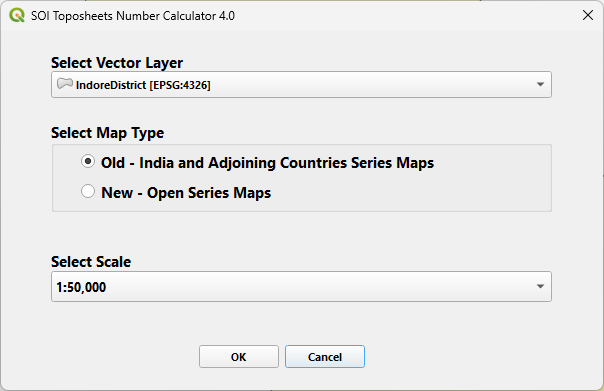
Fig.1 — User Interface of the Plugin
Workflow
- • Computes the sheet boundaries
- • Generates sheet polygons
- • Labels the polygons with sheet numbers
- • Highlights intersecting sheets
- • Adds the generated layer to the QGIS project
TopoSheet Number Calculator Version 4
Significantly simplifies the otherwise time-consuming process of manually identifying Survey of India topographic sheets and provides an efficient GIS-based solution within the QGIS environment.